Beginning a wedding
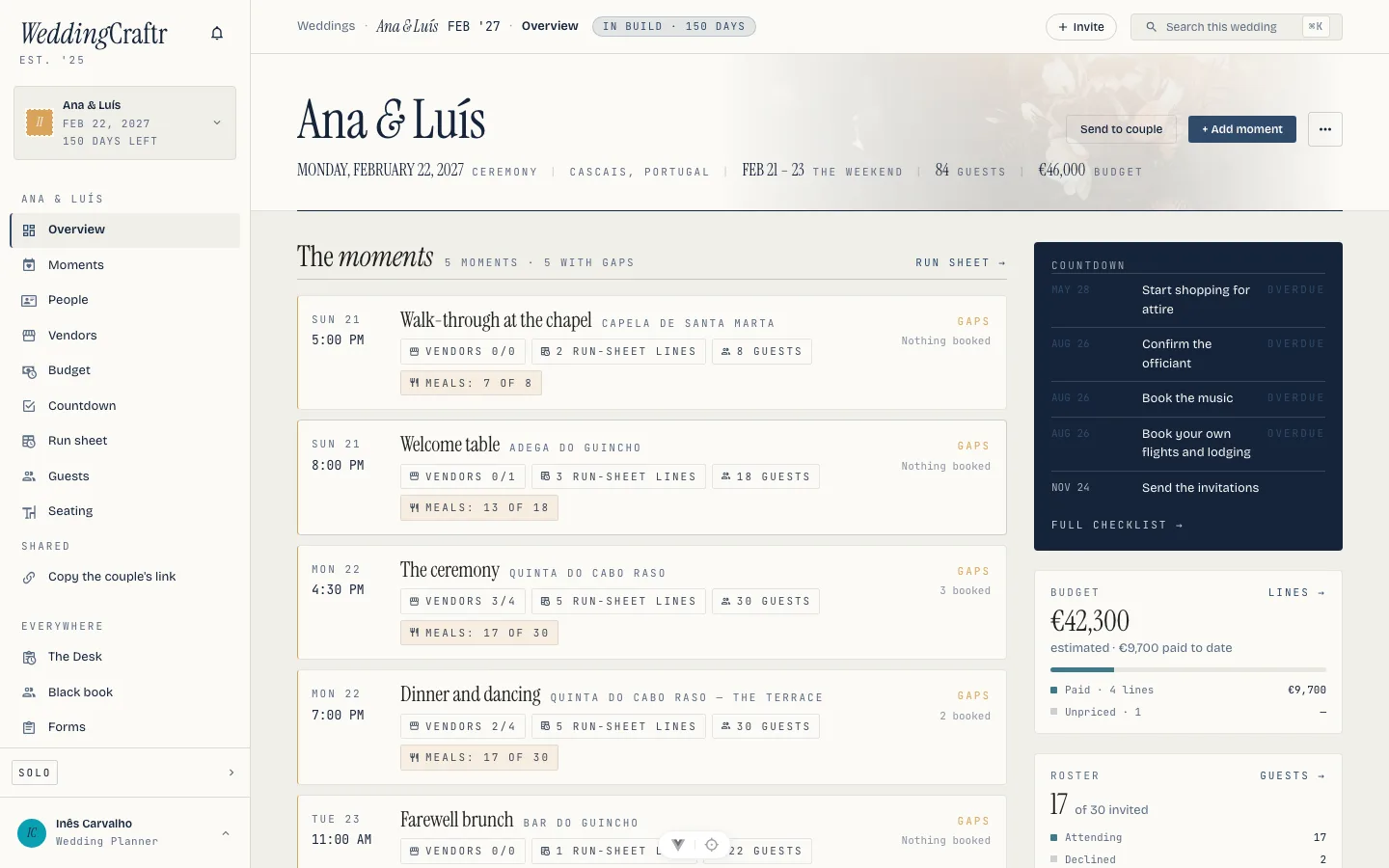
A wedding is a weekend, and WeddingCraftr organizes it around one: the moments (a rehearsal, a welcome party, the ceremony, the reception, a farewell brunch), the vendors who run each one, what each one costs, and the minute-by-minute sheet that makes the day happen.
Underneath, a wedding owns an ordinary trip, which is why the platform's older tools are all still there when a wedding needs them. The wallet holds the contracts, the ledger holds the payments, the roster holds the people. You reach those from inside the wedding, never from a trip tab bar, and this manual calls them the wedding's wallet, ledger and roster from here on. A wedding is titled with the couple and the date, and the product's name is nowhere on it.
What beginning takes#
Beginning a wedding takes a planner subscription, or the 30-day planner trial every new planner account opens on. That trial is where "work it before paying" happens. A couple cannot start a wedding on their own account; they reach one only by being invited into a wedding you have already begun. See The couple and Plans and billing.
On the web, Begin a wedding is on the season board, and it opens as a side panel. Once you have one, New wedding is in the sidebar switcher alongside it. On the phone it is Plan a wedding, the third way to begin on the home screen: "The couple, the date, and the weekend around it."
Start from a spreadsheet#
A filled workbook can begin the wedding as well as Begin a wedding can. On the season board, press Start from a spreadsheet, choose the file, and the form opens already answered wherever the file can answer it: the ceremony date, location, guest target, budget target and modules are carried across. The service level still starts at the default unless you change it, and the couple's names are always yours to confirm.
The file is read before the wedding is created. Its rows are counted sheet by sheet, unrecognised sheets are named, and Create and import makes the wedding first and then brings the rest of the file in. A file with its own moments keeps them; the service-level moments are not added underneath it. A file with no moments still receives the normal starter weekend.
The import is one job with a report, not a blank import screen. After creation, the drawer says which sections landed, which guests were new or updated, and which part of the file remains. If one section fails, the wedding is still real: rerun the file from its import menu and the completed sections are left alone. The same recogniser and preview are used for the nine-sheet workbook, The Knot, Zola, Joy, Google Contacts and a lone CSV; see One file, the whole wedding.
The form#
It asks for very little:
- The couple. Two first names. They are what titles every screen and every email from here on. Ana & Luís, not a project code.
- The ceremony date. The anchor for everything. Phase, countdown, due dates and the run sheet all follow it. Move the date and they all move.
- Where. The town or the venue. This is required, because it is what sets the map, the weather and the cover picture.
- Service level. Full service, partial, or day of.
Then what is on the page: vendors, budget, run sheet, countdown, guests, the table plan, travel. A module that is off is absent rather than empty. There is no dimmed tab and no upsell strip for a module you did not ask for, and you can turn one on later. The switch marked for a client says whose wedding it is: "Their wedding. You're running it, not in it."
Optionally, what you know so far: guests roughly, a budget target, and a line of style ("Coastal, long tables, no black tie") that Lorenzo reads before he answers anything about the wedding.
Pressing Begin sets up the wedding in the background and seeds the default moments for the service level you chose. It is free to set up. The moments, the vendor shortlist, the budget sketch and the run sheet all work straight away.
Editing the wedding#
The … menu on the web wedding opens Edit wedding details. It changes the two partner names, the ceremony date, the guest and budget targets, and the modules on the page. The date remains the anchor: move it and the phase, countdown, due dates and trip window follow. A module turned off loses its section without deleting what is inside it; turning it back on brings the section and its data back.
On the phone, the overview's More action opens Modules for the same module switches. The phone's moment editor handles each moment's name, time, zone and venue; its meal list remains read-only, as above.
The next thing to do on a client's wedding is invite the couple, because a wedding nobody can be invited to is not a wedding yet. That is The couple.
The weekend#
The moments are the spine. Everything else hangs off one.
Each moment carries what it is (rehearsal, welcome party, ceremony, reception, farewell brunch, or another moment of your own), a name, when it starts, its own time zone, and a venue with an address. Each moment keeps its own time zone, so a wedding abroad runs on the venue's clock; changing the zone re-anchors the moment rather than reinterpreting it. Ana & Luís's rehearsal is at the chapel at Santa Marta the evening before, the ceremony at Quinta do Cabo Raso, the reception on the same quinta's terrace, and the brunch at a bar on the beach at Guincho, each a moment of its own.
A moment that feeds people carries its Meals as well, up to eight choices, typed as words. That is what puts the meal question on the reply page: a moment with no meals on it asks none. You set them on the web. The phone can read the menu and the resulting meal counts, but its moment editor does not add, remove or change the choices. See Guests.
Each moment says what it is still missing, in four chips: no venue, no time, nothing booked, no run sheet. A venue counts as set once it has a name or an address. A moment with no zone yet counts as having no time at all.
The wedding's own dates follow the moments, rehearsal to brunch, so nothing has to be typed twice and the wedding sits in the right place on every list.
The deal that books it#
A deal moves from a conversation to a signed, paid wedding in its own way, and Clients and getting paid covers the whole of it. What matters here is the shortest version: a proposal puts a price in front of a couple, and a booking is that proposal with a signature and a first payment asked for as well — so the couple gets one link and does three things on it, in order, rather than three documents arriving separately. Once it is booked, this wedding's stage is Booked and the couple's deposit is on the books.
The thread#
At the foot of the wedding page is What happened: the company thread narrowed to this wedding and the deal it came from, newest first. Sending a proposal, signing a contract, taking a payment, seeding the checklist, a vendor moving, a household answering its RSVP — each is a line here the moment it happens, from whichever door made the change. See all opens the full page for this wedding; see The season. The phone's overview carries the same section.
One file, the whole wedding#
Most weddings already live in a spreadsheet before they reach WeddingCraftr, so the wedding page takes one. The … button at the top right of the band (the same spot on the phone) offers two things.
Download import spreadsheet is a workbook with nine sheets (Moments, Vendors, Guests, Run sheet, Budget, Schedule, Payments, Tasks, Seating), the columns already named, your moments filled in as examples, and a Read me sheet spelling out what each column takes.
Import spreadsheet… reads that workbook back, or any workbook whose sheets it can recognize, or a lone CSV it classifies by its header row. Exports from The Knot, Zola, Joy and Google Contacts are read as they come: split first and last names, their RSVP words.
Before anything is written you see one section per sheet found, in the order they import: how many are new, how many are already here, how many guests are updated, and any moment, vendor, budget line, payer or assignee the file named that the wedding does not have yet. One button imports the lot, moments first so everything that names one can find it, vendors before the run sheet and the budget, the budget before its payments.
Each screen also takes its own CSV. Import CSV… sits beside the paste box on vendors, guests and the budget, and on the run sheet and the countdown, which have no paste. Each one runs through the same preview as a paste would. Payments and schedules come only with the workbook.
Re-uploading is how answers arrive. A guest who is already on the list is not skipped: what the sheet says about them (the RSVP, the meal, dietary notes, a plus one, which moments) is compared with what is here, and only the cells that differ are written, marked as an import. The preview counts those as updated. The couple's wedding website exports every fortnight, you drop the file in, and the roster catches up without anyone retyping a name.
What a free wedding holds#
A wedding whose planner's subscription or trial has lapsed is still a real wedding, with ceilings: six moments, eight vendors, twelve budget lines, and four modules (guests, travel, the countdown and the table plan) that show the upgrade rather than an empty screen. Everything typed inside them survives the upgrade. The ceilings are spelled out in Plans and billing.