The phone app
The iPhone and Android apps carry the same weddings, the same people and the same Lorenzo as the web, live-synced both ways. This chapter covers what is different in your pocket, and what the phone is for on the day itself.
The app#
The WeddingCraftr app is in both stores. Sign in with the same account as the web, and it opens on the weddings board. A WeddingCraftr link (weddingcraftr.com, or an invitation minted for a wedding) opens the app when it is installed, and falls back to the web when it is not.
Getting around#
Home is the weddings board, the same season the web shows, with Plan a wedding as the way to begin: "The couple, the date, and the weekend around it." A wedding opens on the run sheet, because that is the screen the phone is for, with the rest a tab away: the overview, vendors, the budget in both its views, guests, the table plan, People, Checklist (the countdown), and Chat, which is Lorenzo's own tab on the phone. The document inbox, the wallet and the ledger are reached from the overview. Travel & rooms opens from the Guests screen; it is not a separate tab.
The planner's desk also has Run sheets: a shelf of saved run-sheet patterns that can be created, edited, read or deleted before the first wedding exists. From a wedding, the run sheet itself offers Save this sheet as a template and From a template.
Invitation links open in the app. An invite opened before signing in is remembered and resumed right after, and joining always asks first.
What the phone does better#
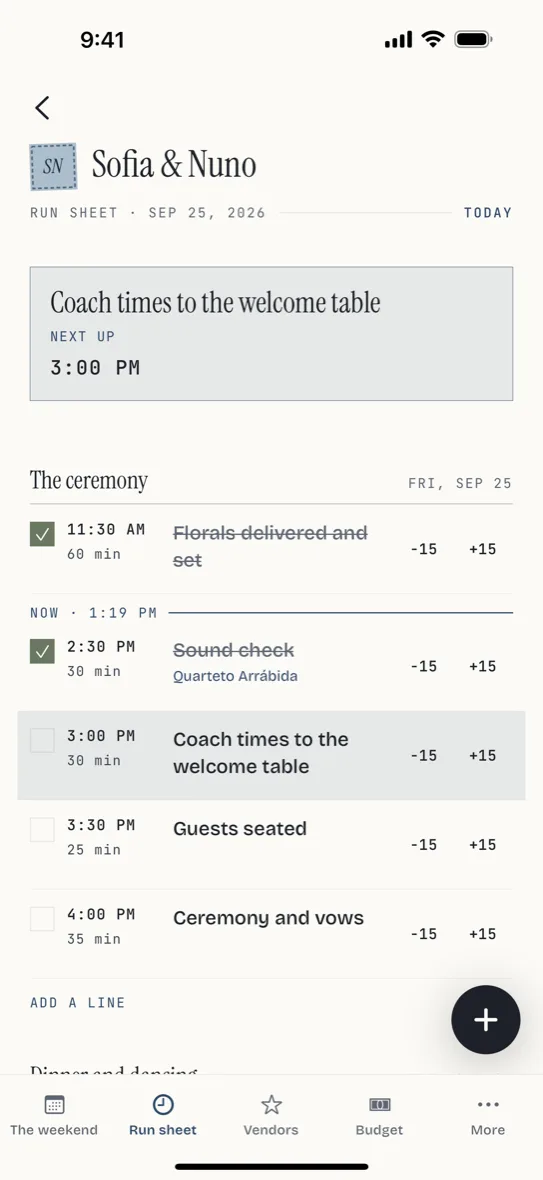
- The day. While the weekend is live, from six hours before the first moment to six after the last, the run sheet pins the next undone line to the top, marks now in the list and highlights the row you are in. Tick a line by tapping its box; the tick is shared, so two phones see one truth. Shift is two taps on a row, −15 and +15. See The run sheet.
- Offline. Any wedding you have opened reads without a signal, and in the final days before the weekend the whole thing (the run sheet, the chat, the decisions) is packed and cached ahead of time; a "Ready offline" pill confirms it. Edits made offline sync when you are back. The venue with no signal is not a problem.
- Offline maps. The bundle packs everything except the map's own tiles, so a pack of its own covers those: press Download the map on the bundle's pill, or on the map screen itself. In the final days the pack downloads on its own on Wi-Fi; on cellular it waits for the press. Profile's Offline maps screen lists every pack with a delete, and sign-out clears them. It needs a professional plan; there is no offline mode on the web.
- The camera. A contract, an invoice or a receipt goes straight from the lens to Lorenzo; photos are converted and shrunk before upload, and the screen stays awake while it runs.
- Push notifications. Alerts, monitor summaries and the inbox's events arrive as pushes. The bell beside the board's account button counts what is unread, and the notifications screen lists it; tapping a push opens the thing it is about and marks the row read. Registration follows sign-in; sign-out unregisters the device, and the icon badge tracks the unread count.
- Share sheets. The hotel's list, the table sheets, the ledger's PDF and CSV and the chat transcript all hand off to the OS share sheet; the calendar feed hands to your calendar app as webcal.
- Forward by mail. The upload screen opens your own mail app with the wedding's private address pre-filled.
- Directions with a choice. Any venue's address opens in Apple Maps, Google Maps or Waze.
- In-app updates. The app fetches its own updates and floats a quiet "restart to apply" banner when one is ready.
Location is asked for only when a chat question needs it, on a card in the conversation, never at install.
What the phone edits, and what it only reads#
The phone is built for the site visit and the day, so it edits what those need and reads the rest.
It edits: a vendor's status, with every state one tap away including declined; run sheet ticks and the ±15 shift; saved run-sheet patterns, including creating one from a finished moment and applying one to an empty one; the rooms in a block, one block at a time, putting someone in, taking them out, filling from answers and setting the release date; the table plan as a list, tap a table for its chairs and a chair to move a guest; the floor canvas, with pinch-to-zoom, two-finger pan, long-press moves, fixture placement and the selected piece's nudge, resize and turn controls; the budget's payments; and the whole invoice book, draft, issue, send, record a payment, void. Send their sheet and Print their sheet are on the phone too.
It reads: a moment's meal options, which are edited on the web; Who to ring, which the web writes; forms, proposals and agreements, which open to read the answers or the audit, send from a template, share the link, download the PDF or void, with no builder and no editor. Template bodies for agreements stay editable on the phone. The ways to pay your account can take are read here too, with a Manage on the web beside them: connecting an account is a link out to Stripe and back, and switching a bank debit on asks Stripe to review a capability, so those two live on the web and the phone shows you where they are.
Taking money at the counter is the phone's own: Collect in person on an open invoice brings up a full-screen code of that invoice's pay page, and the client scans it with their own phone and pays there. It works on any phone, with no reader to set up and nothing to configure. It also offers what is due now against the whole balance, and a gratuity if you have switched those on, and opens the page itself if a phone camera is easier. The card in the phone's own reader — Tap to Pay — is not in this build; it is behind a check that has not passed, and the code is what a phone that cannot take a card still has.
A refund and a write-off are both on the phone. A refund asks for the amount, the reason, and the one decision that is yours: the money owed again, or written off so the invoice settles less. A write-off moves no money at all; it is the allowance you decide on. What may still be given back is what the payment took less what has come back, with a tip covered last — a client who tipped is not owed the tip back. Pressing refund twice refunds once. The invoice's detail also shows the method paying its later instalments and the button that stops it, what has been given back, and what each online payment cost you.
Small differences worth knowing#
- Decisions open as a full screen on the phone; tasks open as a sheet. The functionality matches the web.
- The professional surfaces are on the phone as well as the web. From Profile, a planner reaches the weddings board, the little black book, the deals board, invoices and the billing details, agreements and the team desk. Client Replies is agent-only and is not a planner destination. Public pages (the couple's page, a guest's reply, a vendor's live view) need no app at all.
- The deals board on the phone runs your own pipeline: your stages, Show lost, editing a deal, marking it lost with a reason, and Export CSV. A deal's own page, with its follow-ups, workflows and documents, is opened on the web. See Clients, deals and getting paid.
- Solo is sold in the app, the $19 monthly plan through the App Store and Google Play at its store price, on the paywall that appears where a locked module is met. Studio and every annual price are bought on the web. See Plans and billing.
- A planner account can be made in the app: the wedding app's sign-up makes a wedding planner, the same as on the web. It asks for the country the business is registered in, which is fixed once set.
- Password reset sends the email from the phone; the link finishes on the web.
- Sign-in options include Google, and Apple on iPhone.
- Messaging is in Profile. WhatsApp, Telegram and SMS each connect with a time-limited code; only channels configured for the product appear. See Settings and email.
Inês keeps the wedding app open on Sofia & Nuno's day: the run sheet pinned to the florist's drop at the church, the caterer's live view already on the caterer's phone, and the tick on "guests seated" landing on the couple's sister's phone the moment Inês presses it.