Guests
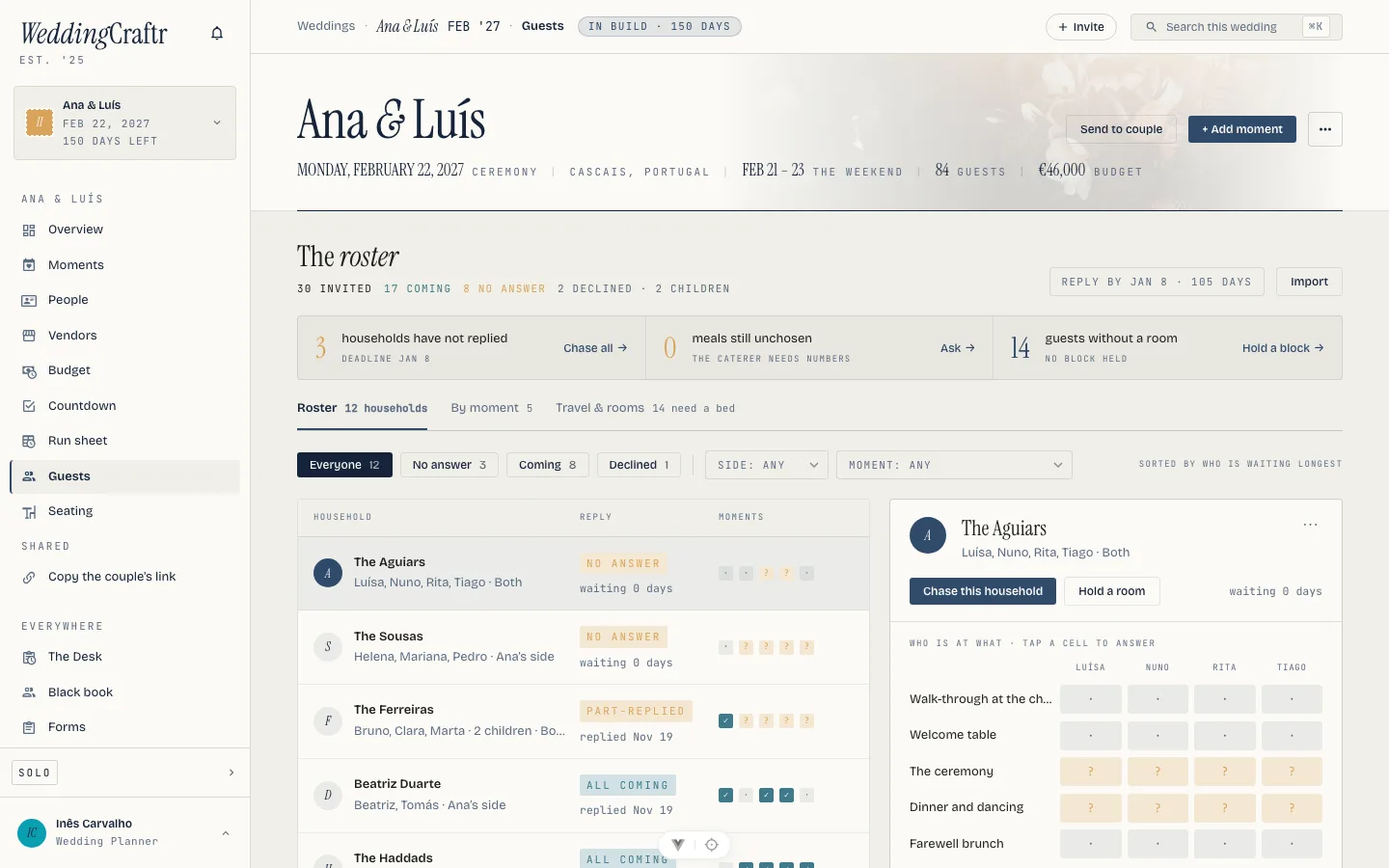
The roster is people and their households, where a household is the invitation unit. It is where the headcount you are billed for comes from, where the meals the caterer owes are counted, and where you ask guests for what you need without any of them ever making an account.
The roster is one of the modules unlocked by your planner subscription. See Plans and billing.
The roster#
Paste the list: one a line, name first, with email, phone, side, list and household in any order. Before anything is created you get check, then add: a preview marking each row new, already on the wedding, or a likely duplicate of someone already there. Duplicates that slip through are folded together afterwards. A CSV file, or the Guests sheet of the workbook described in Beginning a wedding, goes through the same preview, and can also carry the meal, dietary notes, a plus one and which moments each guest is invited to. Once you have defined a guest field in Settings → Fields, the guest template offers it as an extra column too.
Each guest carries their side, their list (A, B and C, or first, second and if there is room), their answer, a meal, dietary notes, a plus one, how many children are coming with them, and whether they need a room, and for how many nights. Meals owed are counted against the moments that serve one, so a wedding with no menu on the ceremony owes no answer about the ceremony. The meals themselves are set on the moment; see Beginning a wedding.
Every answer records who said so: you, the couple, the guest, or an import. Typing over an answer on the roster makes it yours.
The household panel lays all of it out one person to a column, with a column for a plus one who was offered one and one for the household's children. A click on a cell answers it. Taking someone off a moment lives in that person's own edit sheet, where a stray click cannot throw an answer away.
The couple almost always has a wedding website already, so what comes back through it is imported rather than retyped; re-uploading the sheet is how those answers arrive, and only the cells that differ are written. The reply link below is for the wedding that has no website.
Finding a guest#
On the web, the roster filters by reply (All, Pending, Coming and Declined), by side and by moment. A What needs you strip above the roster keeps three numbers visible: households that still have not answered, coming guests without a meal choice, and guests still asking for a room. Each one has its own action, so the strip is a short list of the next presses rather than a second report. Show all expands the roster preview when the first few households are not the whole answer.
The phone has the same job in its own shape: search by name, filter with Waiting, All, Coming and Declined, and keep the chase card and reply-by date visible above the list. Travel & rooms opens from the guests screen; it is not a separate wedding tab.
Asking for details#
Send a details request mints each guest a personal link, the same one the roster mints for anyone on it, handed to you to send however you already talk to them. What it opens is their own page, with the details form on it: their name, phone, date of birth, passport and nationality, filled in by them, the email read-only because it is who the link is. Anyone with no email address on file is named rather than quietly dropped. Guests never make an account. See Sharing outside the app.
Ana & Luís's roster is thirty people across twelve households, and the travel panel counts how many passports are still missing from those links. See Rooms and travel.
By moment#
The By moment tab is the headcount you are billed for: a cell per household per moment reading coming of invited, a totals row per moment, and the meals each household still owes beside them. Invite everyone coming puts everyone who said yes onto every moment they are not on yet, in one press.
A per-head budget line prices itself off this count, so the caterer's balance moves as answers come in. See The budget.
#
Put a Reply by date on the roster and the wedding has a deadline. It is a date rather than a countdown with a grace period: once it has passed, the reply page says so at the top and gives your address, and what the household already answered stays on the page, frozen, with no way to send it again. Late replies come to you, which is what happens anyway.
Inês set Ana & Luís's reply-by date six weeks before the ceremony, because that is the day the caterer's per-head balance waits on.
Asking them to reply#
Ask these guests to reply mints one link per household, the same way the details links are minted, and hands them over for you to send however you already talk to guests. One link answers for everyone at that address, because that is how the invitation went out. A household with no email address on file is named rather than quietly dropped.
The phone's Copy the RSVP links action collects the same household links into one clipboard block, one name and link per line, ready for a message you write yourself. Ask these guests to reply shares the selected households; the copy action is the all-households version for a paste into your own mail.
The chase is on the record: the wait the roster shows counts from the last ask, or from the day the household went on the list if nobody has asked yet.
The reply page#
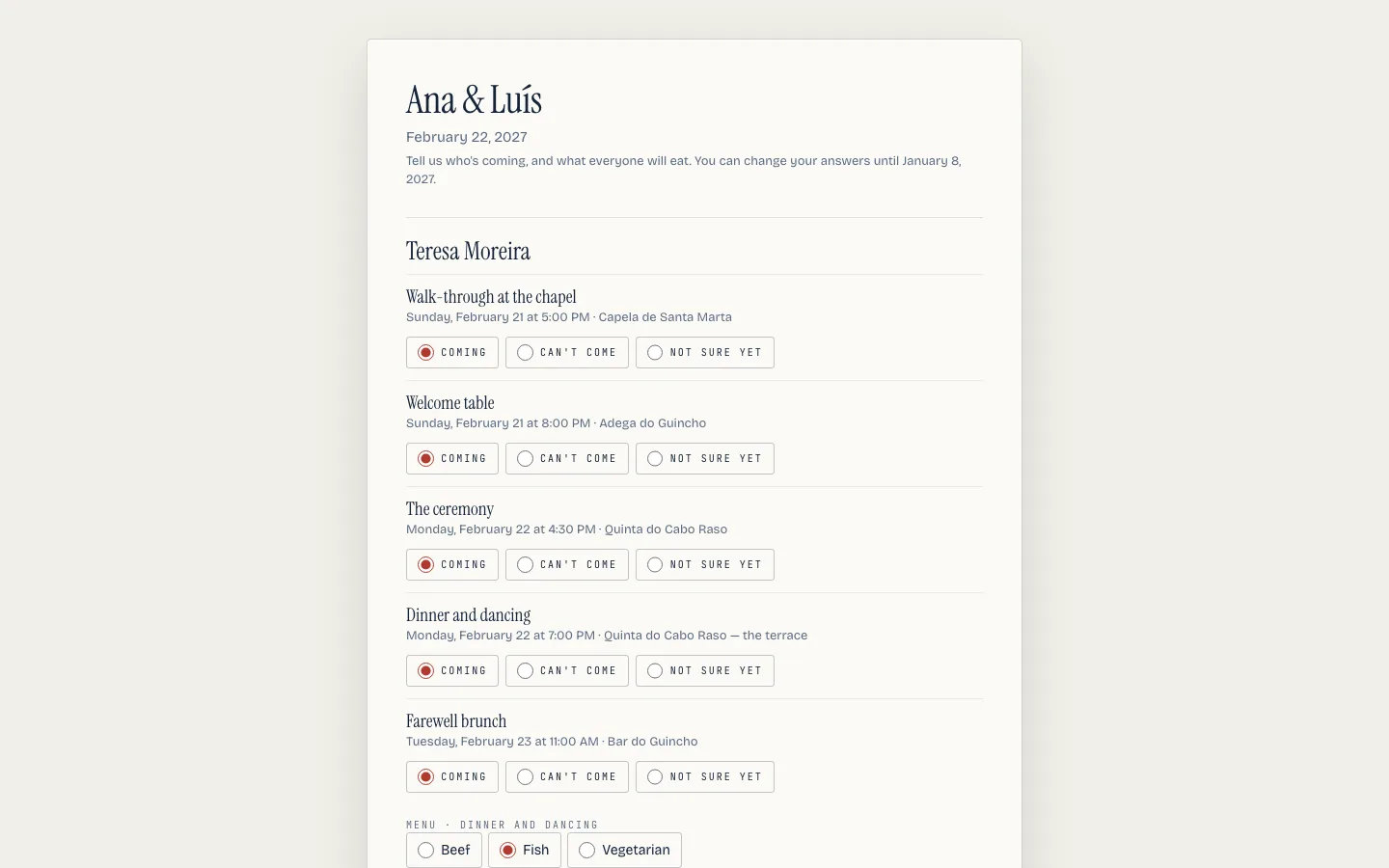
What the guest opens is one page for their household, a card per person, in their own language. On each card:
- a row per moment they are invited to, answered yes, no or maybe. The rehearsal dinner is not the reception, and the caterer bills on the moment.
- the meal, once, named after the moment that serves it. A person eats one dinner, so there is one menu question however many moments they are at, and a wedding whose moments have no menu on them asks nothing.
- anything they cannot eat.
- the plus one, by name, if you allowed them one.
- how many children are coming with them.
Underneath the cards, asked once for the whole household rather than once per person, is the bed: whether they need a room and for how many nights, with the blocks you are holding named below it so they can see which hotel they are answering about. It appears only when the wedding is holding a block. See Rooms and travel.
Guests never sign in and never make an account.
The answer is theirs, and the roster says so: a reply that came in this way is marked as the guest's own, beside the ones marked yours, the couple's or an import's. You can still change any of it, and typing over an answer makes it yours, which is the honest record of what happened when someone phones you instead. The whole-wedding answer follows the moments: a yes anywhere is a yes, a maybe if one is still a maybe, a no once every invitation has been declined.
Asking for meal choices#
Once the moments have their menus, the phone's guest action Ask for meal choices finds the people who said yes but have not chosen a meal and shares their personal details links. It is the caterer's question aimed only at the guests it concerns, rather than another general RSVP chase. The answers land on the same roster rows as the reply page. See Details form.
The same facts, as columns#
None of it has to come through the page. The Guests sheet of the workbook
carries the same facts as columns, Plus one name, Children, Needs
room and Nights, plus one column per moment named RSVP: Ceremony
holding that guest's answer to that moment. A guest who answers in a moment's
column is invited to that moment, whether or not the Moments column named it.
Exports that name them their own way are read as they come: Zola's Plus One Name, The Knot's Kids and Ceremony RSVP, Joy's Needs Accommodation. Split first and last names and their RSVP words are read as well, so the couple's website export drops in without a pass through a spreadsheet first.
Asking Lorenzo#
"Who has not replied?" gives you the households still silent, the answers per moment with the children counted in, and the rooms asked for. "Here is the guest list" with a paste is reconciled against the roster before anything is created, rooms and per-moment answers included. See Lorenzo.