Vendors
The vendors are the people who run each moment: the venue, the caterer, the photographer, the florist, the band. The pipeline keeps where each one stands, what they signed, when they arrive, and who the couple has chosen.
Paste the list#
Vendors arrive as a spreadsheet more often than they arrive typed, so Paste the list is the top of the screen and typing is the correction pass. One a line: the name first, and category, email, phone and site in any order. A tab anywhere means the row came out of a spreadsheet and the commas are data, which is what saves "Bar Alto, Lisbon". A header row is recognized and dropped, and anything already on the list is counted and skipped rather than duplicated.
Import CSV… sits beside the paste box and goes through the same door. A header row there can also carry the moment, the status, a contact name, a website, notes, and an Arrives at time. The workbook's Vendors sheet is the same file; see One file, the whole wedding.
Your own vendor fields — see Settings → Fields — are offered as extra columns in the CSV template, and a sheet that carries them fills them in.
Reuse a vendor#
On the phone, From the book is the other way to add a vendor. It searches the planner's little black book for vendors, leaves out anyone already on this wedding, and shows the name, contact details and how many weddings they have worked. Pick one and its name, email, phone and last vendor category arrive in the vendor form ready to adjust. It is the same contact row the vendor history points at, so reusing a florist does not create a second florist. See Clients and getting paid.
The pipeline#
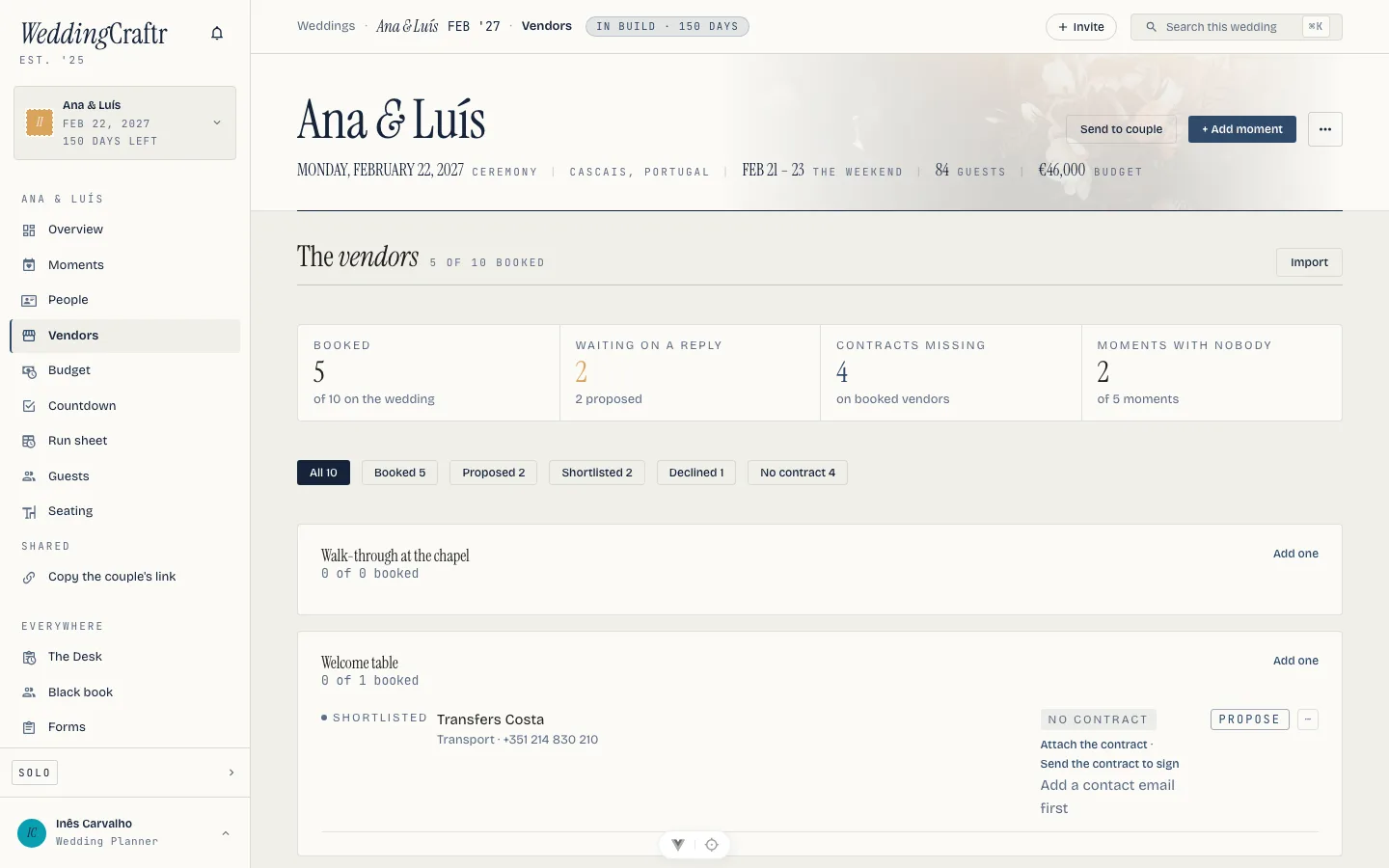
A vendor sits at shortlisted, proposed, booked or declined, and belongs to a moment. The pipeline reads by moment rather than by status, so the reception's caterer, florist and band sit together; a vendor with no moment yet falls into a group at the end. On the phone the status is a labeled button and every state is one tap away, including declined, which is reachable from anywhere and is not one more step past booked.
Each booked vendor moves the row's meter on the season board, which is how a glance at the board tells you the reception is booked and the brunch is not.
The web ledger puts four figures above the pipeline: Booked, Waiting, No contract, and Moments with no vendors. Waiting is the proposed count; No contract includes a booked vendor with no paper or a signature still out. The filter pills narrow the list to All, Booked, Proposed, Shortlisted, Declined or No contract, with the count on each pill.
On the phone, a vendor row keeps the operational shortcuts close: call when there is a phone number, email when there is an address, open the website, and share the vendor's Live View run sheet. The same row also carries Send their sheet and Print their sheet. See Sharing outside the app.
The record#
The vendor record carries what you would ring about: a category from the usual list (venue, catering, photography, florals, music, beauty, attire, stationery, officiant, transport) or any word of your own, since the column is text and a paste is never turned away for a word that is not on it; a contact name, an email and a phone; a website; a note.
On site at is when they arrive, which is earlier than their first line on the run sheet and is the time they ask you for. Left blank it is their first line. The florist on Ana & Luís's day is on site three hours before the ceremony, and that is the time her sheet says.
Attach the contract#
Attach the contract and it becomes an ordinary document in the wedding's wallet. That means it is read, previewable, searchable with ⌘K, and filed with everything else the wedding holds. A contract that arrives by mail, forwarded to the wedding's own private address, lands the same way. See Documents.
Sending a contract to sign#
Where the contract is your own, you need not wait for the PDF. Send the contract to sign on a vendor's row picks one of your agreement templates, the same ones a client signs, and mails the vendor a link to a signing page of their own, no account needed. The row reads Awaiting signature while it is out, with the link to copy if their mail went astray and a way to void it if the deal changes. When they sign, the signed PDF files itself as the vendor's contract and a shortlisted or proposed vendor becomes booked, because a signature is what booked means. A vendor needs an email on the record before the button will press. The templates live in the agreements book; see The agreement.
Filed into the little black book#
A vendor with an email address is filed into your little black book as it is typed, the firm as the company and the contact as the person, so the florist booked on ten weddings is one row there, with every wedding it worked under it. Open her in the book and every wedding she has run is listed, each a link. Nothing about the pipeline changes because of it; the book is the layer that remembers her past the end of the job. See Clients and getting paid.
Send the shortlist to the couple#
Send the shortlist to the couple opens a decision with the vendors as the options, so the couple answers where they answer everything else. Two on a shortlist is the minimum, because one is not a choice. The couple votes from their view, the app, or the link in their mail, and locking a winner tells you which one they picked; it does not book anyone. Inês sends Ana & Luís two photographers; they choose the one whose portfolio has the chapel in it, and the pipeline says so. How the couple answers is in The couple.
Their sheet#
A booked vendor with an email on file carries Send their sheet: their own run sheet, mailed as you, with their arrival, the venue and the numbers to ring. Print their sheet is the same page as paper. Both are covered with the day itself, in The run sheet.
The ceiling#
A wedding whose planner's subscription has lapsed holds eight vendors. When you reach it, the screen says which ceiling you hit rather than hiding the button, and everything typed survives the upgrade. See Plans and billing.