The couple
You run the wedding; the couple is invited into it. They see their weekend, approve or decline what you send them, and never buy anything. This chapter is the loop between you and them: the invitation, the queue, the countdown, and the shortlists they choose from.
Inviting them#
People is where a client wedding starts, because a wedding nobody can be invited to is not a wedding. Invite each half of the couple by email and they get the wedding as a trip of their own, with what is waiting on them at the top of it. They are editors, since they are the other half of the approval loop, but they are not put into your workspace. They see their trip; you see the pipeline.
A new wedding starts in prep, and adding the two partners sends nothing: no invitation, no link, no mail about approvals. You build the wedding, look at it the way they will, and press Open to the couple when it is ready. The press invites both partners once and mails each a welcome from you. It also opens the parts you have not already decided, and a part you set to Hidden stays Hidden. See What you open for them.
That invitation always sends them to TripCraftr, the travel app underneath, never to WeddingCraftr: the couple hold an ordinary traveler's account there. Their wedding sits in their trips list as a trip with a ring mark and a count of what is waiting on them, and it opens as any traveler's trip does, on the web and on the phone: the itinerary, the documents, the expenses, decisions and chat. At the top of the overview, Waiting on you holds what you have sent, with Approve and Decline beside each item, and points at the decisions still open. There is no separate wedding screen for them, and there is meant not to be: the trip is the wedding.
Until one of them is on the roster with an address there is nowhere to send anything, which is why the screen leads with the two invites. Someone with an account under that email is on the wedding immediately. Someone without one becomes a pending invitation, and the wedding is waiting for them when they sign up with the same address. The roster's roles are covered in People and the team.
Copy their link mints the couple's hub link for the first partner with an address. It is for a partner who would rather not install anything: hand it to whichever of them you are speaking to. Before you open the wedding it is refused, because a link cut in prep would open onto nothing. What it opens is described in Sharing outside the app.
On Ana & Luís's wedding, the two invites went to Ana Moreira and Luís Tavares before anything else was typed.
Sending them something#
The web header's Send to couple copies the couple's trip-level link; it does not release a particular run-sheet line. The approval action lives where the line lives: on the web, open the wedding's Countdown and use its approval section; on the phone, use Checklist or the run-sheet item's Send to couple action. The line becomes an item under Waiting on you, and the couple can answer it in their trip or from the link in the mail.
Copy the couple's link, in the sidebar, mints the same link as the People screen; open it yourself and you are looking at exactly what they will, which is the honest check before you press send.
Forms in their trip#
A form you send to the couple does not only live in their mail. It appears on their trip overview under Your planner asked, on the web and on the phone, and they fill it in there — one page at a time, with their answers kept as they go, and the questions that do not apply to them never shown.
It is the same form and the same request as the mailed link, not a second copy: what they answer in their trip is what you read on the request, and what they answer from the mail is what they see back in their trip. A second person on their trip is not offered a form meant for the two of them.
The page shows nothing at all when there is no form, so a couple with nothing to do does not read a heading to find that out.
The queue#
With the couple is the list of everything sent and unanswered, with how long each has been sitting there. The couple answers with Approve or Decline inside their trip, on the web or in the app, or from the link in their email without opening either.
Approving confirms the item. Declining leaves the item as it is.
The same list sits beside the season board as Sitting with the couple, across every wedding you run, and the board's row flags a wedding that is waiting on them. See The season.
Every morning something is waiting, the couple gets one mail about it, in their local morning. It is the only wedding mail that goes to them. See Settings and email.
The countdown#
The countdown is this wedding's task list, and it has its own chapter now that it has a board, an assignee list and a history. See Tasks and workflows.
Shortlists, as decisions#
When the couple has to choose, the choice is a decision: put the options up, collect the answers, lock the winner. Send the shortlist to the couple on the vendor pipeline opens one with the vendors as the options, so they answer where they answer everything else. Two on a shortlist is the minimum, because one is not a choice. See Vendors.
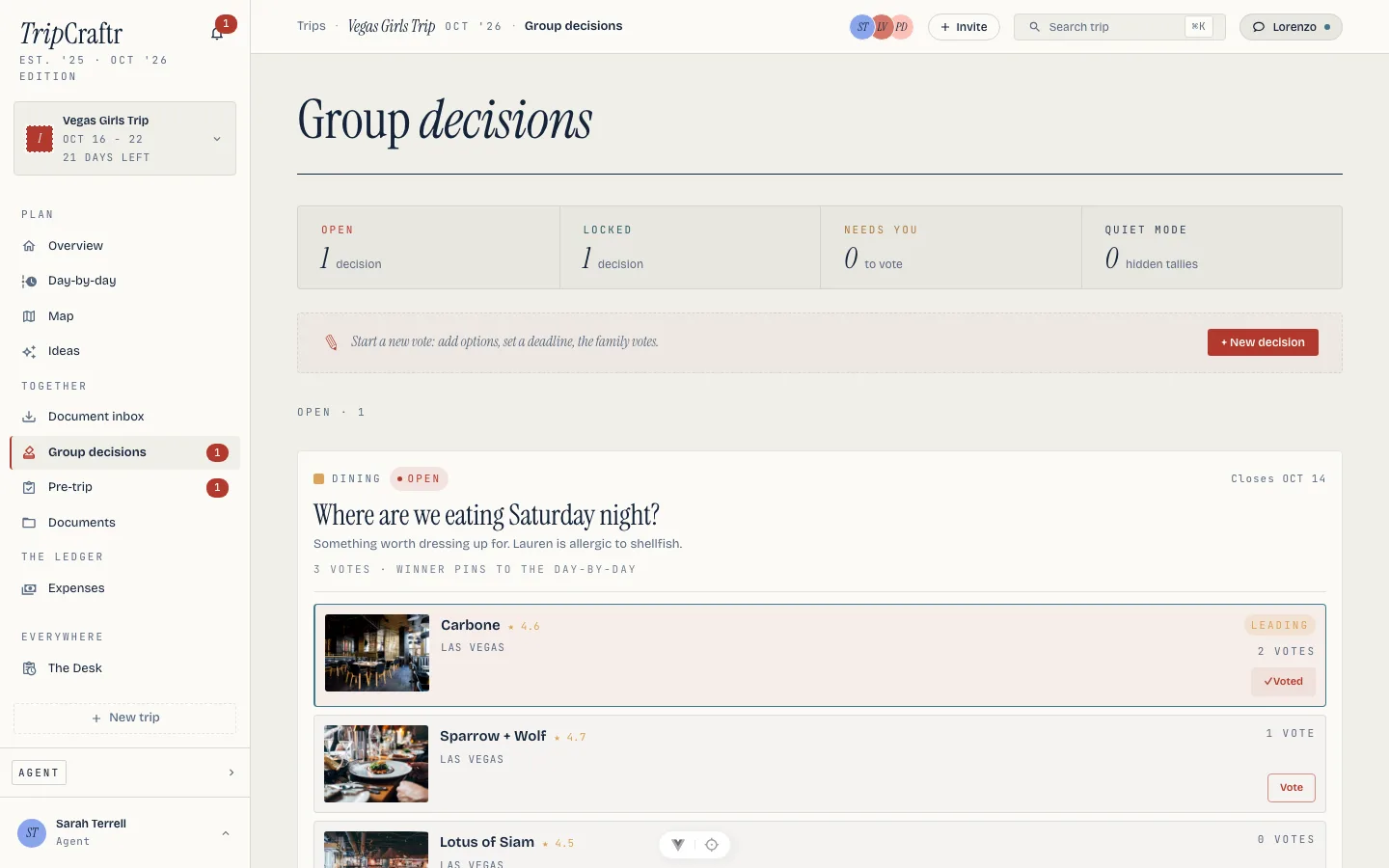
+ New decision opens the builder for anything else: a question, options, a mode and optionally a deadline. Options can be freeform, or typed for the common calls, restaurants, hotels, flights, cars and activities, each with its own fields. Paste to parse reads the fields out of an offer or an email, and a pasted hotel link unfurls into its name, price and dates. Options that came from a link keep it on the card. Decisions draft first and publish when ready, so a half-built shortlist is not visible to the couple. Lorenzo can propose the options from chat as well.
Open decisions show every option with its votes and a "leading" marker. Each person votes their pick, and can change it until the decision closes. Quiet mode seals the tally while voting runs, so nobody anchors on the count, and the votes reveal when it closes.
A decision ends two ways: Lock with current leader, whenever you are satisfied, or the deadline passes and it locks itself on the count. Locking a vendor shortlist does not put a caterer on the itinerary; it tells you which one they picked. A decision set to create an item pins the winner to the day-by-day instead.
Nobody needs the app, or an account, to answer. Request votes by email sends each email-only participant a ballot link: a page with the open decisions and their options, where they vote and can change their vote until the decision closes. Quiet-mode tallies stay sealed on the ballot too. Ballot links are personal and expire after 30 days, votes count in the same tally as in-app votes, and if that person later creates an account with the same address their votes reconcile onto it. Lorenzo can send the ballots too, when the owner asks him to. See Sharing outside the app.
What you open for them#
A wedding starts closed. The couple can be inside their trip the moment you invite them, but what they find of the wedding is yours to open, one part at a time: Budget, Tasks, Run sheet, Guests, Notes, Documents, Music, Design and Website. Nothing is open by accident, and a part you have not opened is one they cannot see at all.
Three levels, and the third is not "less". Hidden is off. View is on and read-only. Contribute is on and they can change things. "Hidden" is its own level rather than a missing row on purpose: you sometimes need to say "not yet" as a decision, and a decision should be able to override a lower permission you gave elsewhere.
Open the wedding is the one press that takes it from closed to open, and it is a press you can undo. Until you do it, a level you have set changes nothing — which is what makes the sheet safe to fill in as you go rather than all at once before you have thought about it.
The day is the run sheet part. What the couple sees is your couple's day view (see The run sheet): it starts as the master timeline, and you can narrow it, add lines from other timelines, or switch it off in Views, which hides the page. In their trip, on the web and in the app, they open The day and read the moments on each moment's own clock. Their trip itinerary shows them only the run-sheet lines that day names, so the vendor load-in you keep on another timeline never lands in their list. A guest on the same trip sees none of it.
Music is opened the same way. A partner you have given Can pick sees the slots that need a song, and picks from their trip on the web or in the app, up to the date you set; a locked song stays where you put it. They can take back a song they added, even after that date. They cannot edit the planner's songs or see the Download PDF. Set the date and who may pick under Share with the couple on the Music page.
The sheet has one block per person on the roster who holds a level, the two partners first, and one row for each of the nine parts. It saves in one press.
Preview shows the wedding as one particular person sees it, from the access sheet. It is how you answer "what does she actually get?" without asking her, and only you can do it: a couple cannot preview themselves as somebody else.
On the phone, the couple reach it from their trip. Your wedding is in the tab row, and it lists the parts you have opened with the level on each, so a couple who can read the budget but not change it can see that, and a part marked not yet is something to ask you about rather than hunt for.
The budget#
When the Budget part is open, the couple read the budget you have shared: each section and line you have not hidden, with what is estimated, committed, paid and left, and the dates and who pays each. At the level that lets them mark payments, a date that is theirs to pay carries We paid this. It writes one payment to your ledger, marked as reported by them, and you are told. A week and a day before a date the couple pay themselves, they get a short mail about it, once each. Your own payments to vendors are never mailed to them.
Files and comments#
A file you upload to the wedding's Documents reaches the couple when their Files part is open, marked From your planner. Hide from the couple on a file keeps it back: a vendor contract, say, stays yours while the menu goes out. A held-back file is gone for them completely, its link included, and a guest who holds a seat on the trip sees only what they filed themselves.
The couple can comment on a task, a file and a note, where you have let them change the part. You are told in the app and on your phone, and your reply marked With the couple reaches them the same way. Only the planner is a comment nobody else reads. A line you have sent for approval stays on their trip and stays answerable whatever you decided about the run sheet.
Where the couple cannot go#
The couple approves and declines, votes, ticks their own countdown jobs, and reads the weekend as their trip's itinerary. Two presses are yours alone, and a couple who tries them is turned down rather than sending in your name: mailing a vendor their run sheet, and seating the room block. See The run sheet and Rooms and travel.
After the wedding#
One last mail follows all the others, and it breaks their shared rules on purpose. It lands exactly fourteen days after the ceremony, well into wrapped, and it comes from TripCraftr, not from WeddingCraftr: the wedding is done, and the honeymoon is a trip, in the app built for one. It opens Lorenzo's planning chat with the couple's opening line already typed for them, "We just got married, help us plan the honeymoon," so they start mid-conversation rather than at a blank page. It reaches the TripCraftr account the invitation already opened for them, once per person, ever. Nothing else is built to keep the couple close once the wedding is behind them. This is the one deliberate exception, and the last thing either of them hears from you. See Settings and email.