The season
The season board is the planner's morning screen: every wedding you can reach, grouped by where it stands, with what is due and what is sitting with the couple beside it.
The board#
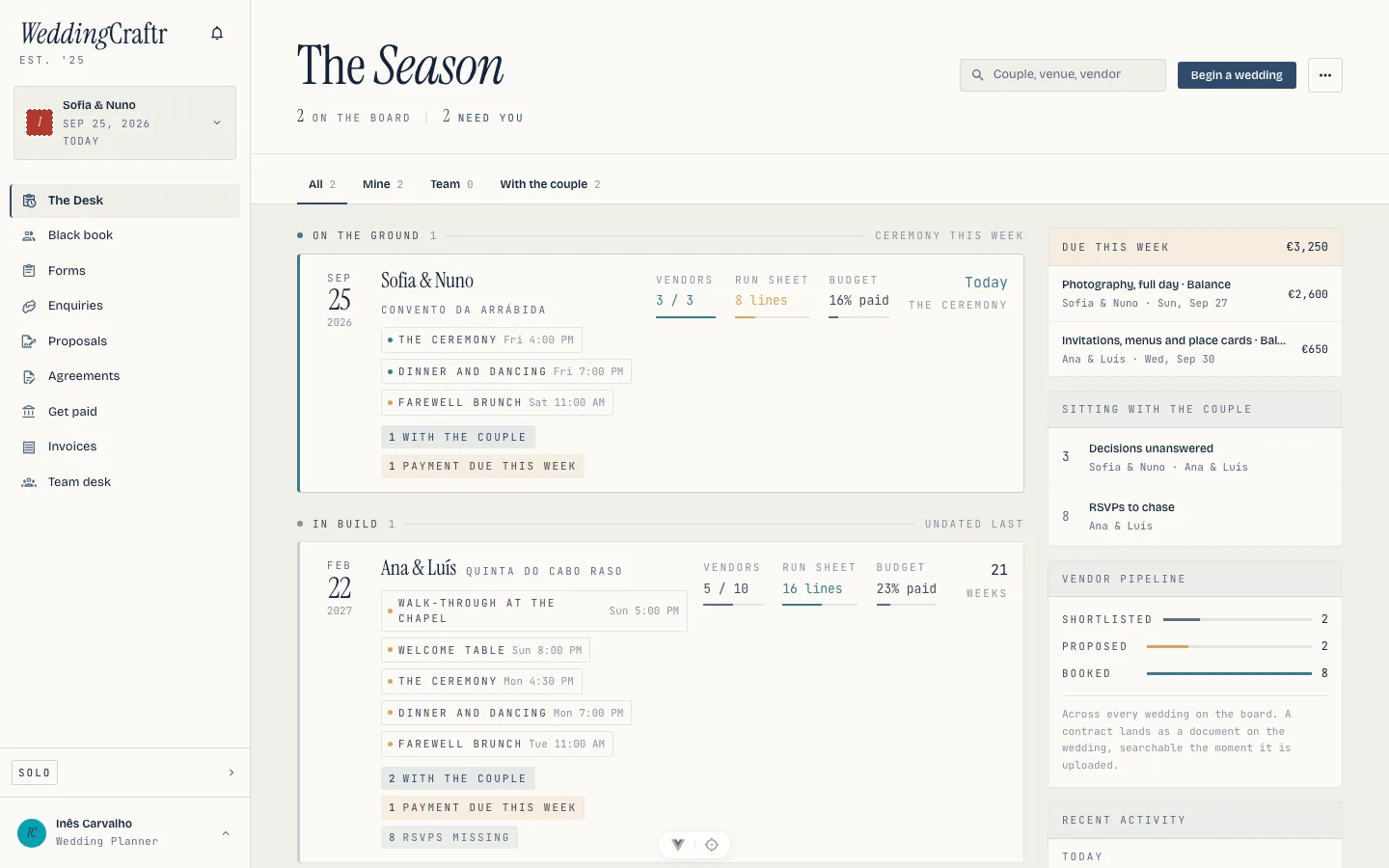
Phases run on the ground (the ceremony is this week), final weeks (inside 60 days), in build, and wrapped. Phase follows the ceremony date; within each phase the soonest ceremony leads, and undated weddings sit last. A wedding never moves up the board because a count came in. Move the ceremony date and the wedding moves to where the date puts it.
Each row carries three meters, for vendors, the run sheet and the budget, and the flags for what needs you:
- with the couple: something you sent and nobody has answered.
- lines due this week: counted in milestones rather than lines. A caterer paid in four is four chances to be late, and the flag says so.
- rsvps missing: households still silent past the point you asked.
A row carries a flag only when something is waiting. Inês's board reads Sofia & Nuno at the top, live, and Ana & Luís in build with a payment falling due and two households yet to reply.
Due this week, and sitting with the couple#
Two panels sit beside the board. Due this week lists every milestone falling due across every wedding, and each row opens that wedding's budget straight onto it. Sitting with the couple is everything you have sent and nobody has answered, however long it has been waiting. Both are the same figures the Monday mail tries to say in a sentence; see The week ahead.
Activity#
A Recent activity card sits under the pipeline on the board: the last few
things that happened, each line opening the thing it is about, with the
wedding's name under it. Its See all opens Activity (/activity), the
company-wide thread: what was sent, signed, paid, answered and moved, newest
first, grouped under Today, Yesterday and the dates before, what you did
reading as "You". Chips narrow it to leads, documents, payments, tasks,
vendors, guests or planning, and only the kinds that have happened show. Scope
it to one wedding with the link from that wedding's overview, or clear the
scope to see the whole season.
The thread is written for you, not by you: sending a proposal, signing an agreement, taking a payment, seeding a checklist, moving a vendor, a household answering its RSVP each land on it the moment they happen, from the web, the phone, Lorenzo or a client's own page.
When the season is empty#
An empty board offers three ways to get the desk ready while the first work arrives: Build your vendor book for the firms you expect to reuse, Save a run-sheet template for a standard wedding day, and Invite your team so their weddings appear under Team. They are setup shortcuts, not extra wedding types: each opens the same surface you would reach from the profile or the desk. See Vendors, The run sheet and People and the team.
Finding a wedding#
Filter the board to All, Mine, Team or With the couple, and search by couple, venue or vendor. A search for the florist finds every wedding she is booked on, which is often the question a phone call starts with.
Begin a wedding sits on the board, and once you have one, New wedding is in the sidebar switcher alongside it. See Beginning a wedding.
What the phone shows#
The season board is on the phone as well, as the home screen of the WeddingCraftr app, and a wedding opens from it straight onto its run sheet rather than its overview, because the run sheet is what a phone is for on the day. See The phone app.